Mikrotik: users not able to login using multiple devices
If you have someone trying to log in on a secondary device where you have a Mikrotik device providing the Purple WiFi service this may well be because the default setting on such systems is to only allow a username (login) to be used once.
You would need to load the interface with your Mikrotik Device (you can use Webfig or Winbox for this) and navigate to
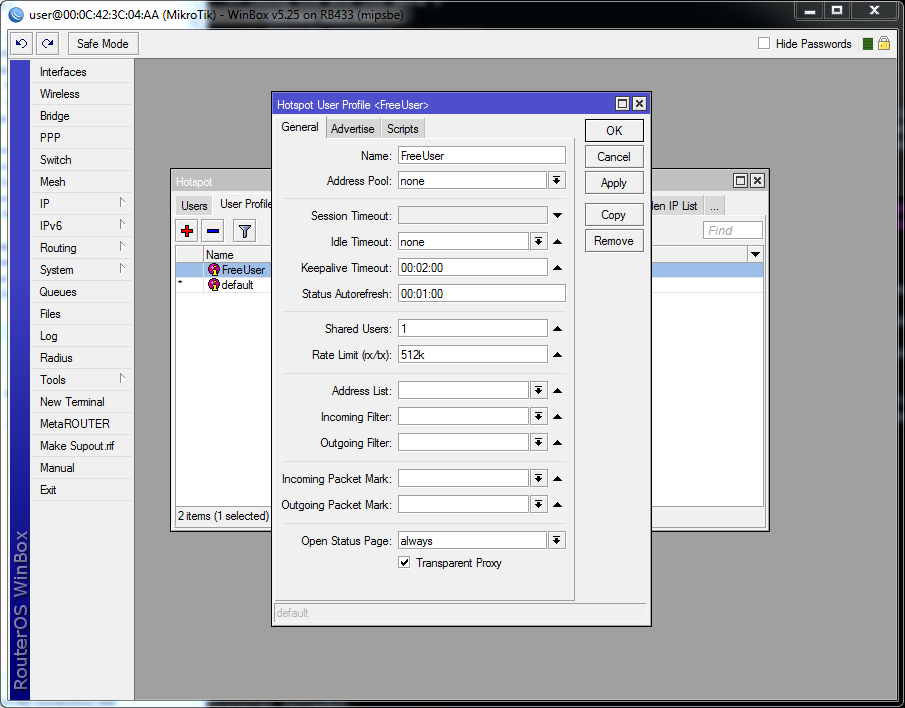
IP > Hotspot > User Profiles > Profile > Shared Users
This is set to 1 as default.
To increase the simultaneous user limit, you can either directly increase the numerical value here or click the triangle at the end of the line to remove the restriction for this setting entirely.


Comments
Post a Comment